
-
ACL KSA
API-SEVENROOMS -
Coya Restaurant
https://coya.i6.platx.me/inconcert/apps/agent/1033 -
Ergodotisi in Cyprus
Deployment on InConcert cloud:https://cls22-itx-mad.i6.inconcertcc.com/inconcert/apps/agent
IVR files: Ergodotisi_ivr_wav_files
SIP trunk configuration: Asterisk Implementation -
MFC KSA
IVR flows renamed and converted to inConcert format mfc_audios_ic_formatted_renamed_v2
License file request: License file request
i6 VM MAC address: 00-15-5D-E8-23-01
License file: License File
MFC IVR flows: MFC_IVR
IVR_TO_CC
inConcert WebApp: Popup
SIP trunk configuration and DIDs: DIDs_TO_Venues
DIDs_Assignment
-
MIM Materials
IVR Flow POC:https://ocx01.i6.platx.me/inconcert/apps/agent/1033https://www.figma.com/file/XcmPQeQcQbiMmULBBj31Fp/MIM-IVR-Tree-(Copy)?type=whiteboard&node-id=0-1
WebBot POC:https://www.figma.com/file/BgDR1KOvKz2c0PjeHyyemv/ChatBot-(Copy)?type=whiteboard&node-id=0-1
Get ticket status by ID: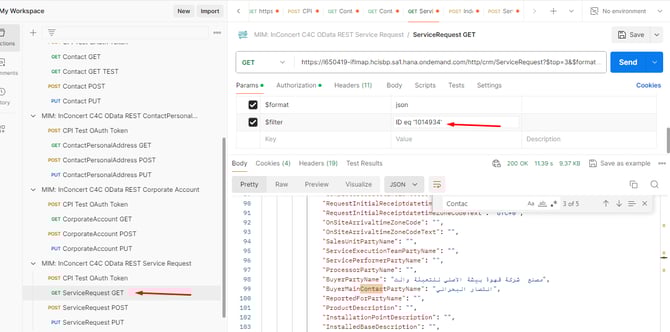
CTI POPUP URL:
http://localhost:36729/?CID=BCM1234&ANI=01094376522http://localhost:36729/?CID=BCM1234&EMAIL=m.kilzi@gmail.comhttp://localhost:36729/?CID=BCM1234&Email=m.kilzi@gmail.com&ANI=01094376522&TicketID=969
Important parameters when create new ticket from IVR:
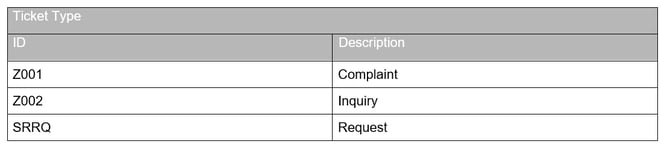
"ProcessingTypeCode":"Z001",
"BuyerMainContactPartyID":"1000370", = ContactID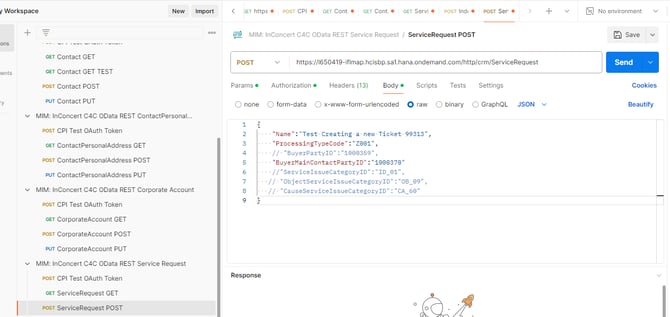
Email Account;
MIM_2024@outlook.com
P@ssw0rd@2024 -
StrongSwan config
we need to open these ports on cloud which i still didnt Open ports: 500 (IKE), 4500 (NAT-T), and 1701 (L2TP).
ubuntu server latest install 22.04
sudo apt-get update
sudo apt-get install strongswan strongswan-pki -y
sudo apt-get install libcharon-extra-plugins -y
mkdir -p ~/pki/{cacerts,certs,private}
Generate a CA private key: psec pki --gen --outform pem > ~/pki/private/ca-key.pem
Generate a server private key: ipsec pki --gen --outform pem > ~/pki/private/server-key.pem
7. Edit the /etc/ipsec.conf file:Oracle:
config setup
charondebug="ike 2, knl 2, cfg 2"
conn %default
ikelifetime=60m
keylife=20m
rekeymargin=3m
keyingtries=1
authby=pubkey
keyexchange=ikev2
conn site-to-site
left=%defaultroute
leftid=@<your-server-public-ip>
leftcert=server-cert.pem
leftfirewall=yes
right=myremote.ddns.net
rightid=@myremote.ddns.net
rightsubnet=192.168.2.0/24
auto=add
remote site:
config setup
charondebug="ike 2, knl 2, cfg 2"
conn %default
ikelifetime=60m
keylife=20m
rekeymargin=3m
keyingtries=1
authby=pubkey
keyexchange=ikev2
conn site-to-site
left=%defaultroute
leftid=@myremote.ddns.net
leftcert=server-cert.pem
leftfirewall=yes
right=<your-server-public-ip>
rightid=@<your-server-public-ip>
rightsubnet=192.168.1.0/24
auto=add
8. Edit Edit the /etc/ipsec.secrets file
add this line:
<your-server-ip> : RSA server-key.pem
9. sudo systemctl restart strongswan-starter.service
10. if this directory not there, create it /etc/ipsec.d/cacerts
11. nano /etc/ipsec.d/cacerts/ca-cert.pem
12. paste oracle CA in the file:
-----BEGIN CERTIFICATE-----
MIIC9DCCAdygAwIBAgIIebTj2a2Ke8MwDQYJKoZIhvcNAQELBQAwGDEWMBQGA1UE
AxMNc3Ryb25nU3dhbiBDQTAeFw0yNDA2MTkxMDEwNTBaFw0yNzA2MTkxMDEwNTBa
MBgxFjAUBgNVBAMTDXN0cm9uZ1N3YW4gQ0EwggEiMA0GCSqGSIb3DQEBAQUAA4IB
DwAwggEKAoIBAQC0JZXWWCpkP3MA7mrSz6uNyMZufEzx3TwUyq8r7mzuL5oj7iQm
uGhUqu0XLAVWc5MOc6P0fcgeI2P///G7Y/qCs6dIiwgUsSo5UraCTNSzSix/tlnu
f6m/BNGdw2ByUDFzElxgEMDJ9uYOl8moMLbBBi/f8axctIBaMnftMDQvkejrPO+0
6qlJEuPWnfNL+fw2nrarxxjSCfouSkH9x14QZbent+gOwPfJbJfg/T7YXMvL8F0v
AI5auDemRmAvGEAhjbFM5KdzoozCwO4UovOCC2dvJo4G0vpZ7bqepPh7vOndDpQx
hte/hdNVsLfwauQ2ktVk6qr4XaSRzk0B/wK5AgMBAAGjQjBAMA8GA1UdEwEB/wQF
MAMBAf8wDgYDVR0PAQH/BAQDAgEGMB0GA1UdDgQWBBT6kRNYYHSTsvw/jSdjJ3YZ
UKA8lDANBgkqhkiG9w0BAQsFAAOCAQEAQ5ZezrY7HtJZOEHxOibPLveuODBGbWAl
6p8gk0O1toM7yNo+UcTBkWZOxP7MAtSsZqD2U+YoGpfUAYC0BkUq1R0kWHlqIPhK
OeMfpvVJiDSH0Lm6ittTlpCR5Cos8KNeQXvv50y7B+fFeGNEWQeZ7nr9ibyy8eax
KextGCarQg+NiIzlG5r0viWqER+S6MWnu4UeJ+5gqHPIwsBvwmCaBbdUo/+arvyC
K4T6Tw1qPlepqyWO07gexgnsTQs+A+kH7rwFHOCggIRyJhuEIpe9rTEGXiRlliNl
0bq2fjuuzyo7jLOHKX2HdOl793j11y2fZdZffs6g82GsrQGBNc5CCA==
-----END CERTIFICATE-----
13. copy the certs:
sudo cp ~/pki/certs/server-cert.pem /etc/ipsec.d/certs/
sudo cp ~/pki/private/server-key.pem /etc/ipsec.d/private/
14. Edit /etc/ipsec.secrets:
: RSA server-key.pem
15.sudo systemctl restart ipsec
16. allow forwarding: sudo sysctl -w net.ipv4.ip_forward=1
17.sudo systemctl restart strongswan-starter.service
18. sudo ipsec statusall
19. sudo ipsec up site-to-sit
-
SurfAbudhabi - Modon
Seven Rooms API:
Client ID
4dc28e2d57cd6a6f487cc751b397447fa13ae4a26afd91064a86c9cd56917116b27e32ceeb7f824e14057fb6ef1d89305782ebd576271d9446e551ecd16a66cdClient Secret56d03fee8c37da3f57eefe2ce7ff9bf896cb324fb9293a1d4cce3ee871476925f61a0167e42f0047b68ca2cd3ab7c0a3501471b92286b9852fc0e654e2ddfa82
Venue Group ID
ahNzfnNldmVucm9vbXMtc2VjdXJlciELEhRuaWdodGxvb3BfVmVudWVHcm91cBiAgIqlw_u-CAwIVR Design:

Social media chatbot: