---
title: MySQL installation process for inconcert
description: MySQL installation process for inconcert
---
[Skip to content](https://knowledge.platx.me/platx-knowledge/mysql-installation-process-for-inconcert#main-content)
English
Show submenu for translations

Open main navigation
Close main navigation
- English
Show submenu for translations
- Contact us
Contact us
How can we help you?
- There are no suggestions because the search field is empty.
1. [Platx Knowledge Base](https://knowledge.platx.me/platx-knowledge?hsLang=en)
2. [Guides](https://knowledge.platx.me/platx-knowledge/guides?hsLang=en)
# MySQL installation process for inconcert
For the installation of MySQL the same chef-cookbook scheme will be used as for the rest of the system.
The following are the configuration points and steps for installation
MySQL was homologated on both Ubuntu 18 (bionic) and Ubuntu 22 (Jammy)
#### Databag for MySQL.
The databag file with the MySQL configuration data is: /etc/inconcert/chef/data\_bags/mysql\_clusters/default.json
The main parameters there are:
- Package Resources: repo\_pack\_debian\_8\_url, repo\_pack\_ubuntu\_bionic\_url, and sources are the parameters of the connection data to the package repositories. This is identical to the inconcert databag.
- install\_type: in this parameter it does indicate if the installation is carried out on an exclusive server for MySQL or it will be a server shared with the rest of inconcert. This is used only for the configuration of iptables. Possible values:
- "standalone" : in this case the IPtables are configured from scratch by enabling only the MySQL ports.
- Any other value: In this case, the server's iptables are not changed.
- mysql\_port\_ tcp port for MySQL Server. Defaul: 3306
- enable\_replication: true/false, indicates whether you want to enable slave master replication.
- user\_replication: The name of the user that will be used for replication.
- password\_replication: This is the password used by the replication user.
- node\_master.
- id = hostname of the server where we will install MySQL.
- mysql\_private\_ip = indicates the private IP to be used by the master node.
- server\_id = Unique value that identifies the server. By default we will always set the value 1.
- node\_master. It's a set of servers. Each server will have:
- id = hostname of the server where we will install MySQL.
- mysql\_private\_ip = indicates the private IP to be used by the master node.
- server\_id = Unique value that identifies the server. By default we will always set the value 2 for the first replica and a consecutive value if it is necessary to install more replicas.
- inconcert\_nodes: IPs of the Inconcert nodes that will use the MySQL cluster. This is used when it is a standalone installation to include the nodes in the iptables.
The databag file must be identical across all nodes in the cluster.
### Databag examples
Environment without replication:
```
{ "id" : "default", "repo_pack_debian_8_url" : "", "repo_pack_ubuntu_jammy_url" : "archive.ubuntu.com", "sources" : { "server" : "packages.i6.inconcertcc.com", "module" : "jammy-testing", "repo" : "ubuntu" }, "install_type" : "standalone", "mysql_port" : "3306", "enable_replication" : false, "user_replication" : "", "password_replication" : "", "data_path":"/mysql/data/", "log_bin_path":"/var/log/mysql/", "log_max_days":"5", "node_master": { "id" : "ubuntu22mysql", "mysql_private_ip" : "192.168.24.104", "server_id" : "1", "node_slave": [] }, "inconcert_nodes": [ { "inconcert_private_ip" : "192.168.24.201" } ]}
```
Replicated environment:
```
{ "id" : "default", "repo_pack_debian_8_url" : "", "repo_pack_ubuntu_jammy_url" : "archive.ubuntu.com", "sources" : { "server" : "packages.i6.inconcertcc.com", "module" : "jammy-testing", "repo" : "ubuntu" }, "install_type" : "standalone", "mysql_port" : "3306", "enable_replication" : true, "user_replication" : "replication_user", "password_replication" : "12345678", "data_path":"/mysql/data/", "log_bin_path":"/var/log/mysql/", "log_max_days":"5", "node_master": { "id" : "ubuntu22mysql", "mysql_private_ip" : "192.168.24.104", "server_id" : "1", "node_slave": [ { "id": "ubuntu207", "mysql_private_ip": "192.168.24.207", "server_id": "2" } ] }, "inconcert_nodes": [ { "inconcert_private_ip" : "192.168.24.201" } ]}
```
The replication user will be created only with the chef run.
#### Pre-check-ups
Before running the MySQL installation, the following points must be verified:
- Validate that there is no previous installation of MySQL on the server. This can be done by running the command:
`dpkg -l | grep mysql`
#### Note: If there is already a previous installation, you must delete it before continuing, in the comments you can see an example.
#### Run Chef
Once the databag is complete, the following command must be run to install MySQL:
`chef-solo -c conf/solo.rb -j conf/cluster/production/mysql-node.json`
#### Post-Installation / Services
To view the status of the mysql service you can use the command:
`systemctl status mysql`
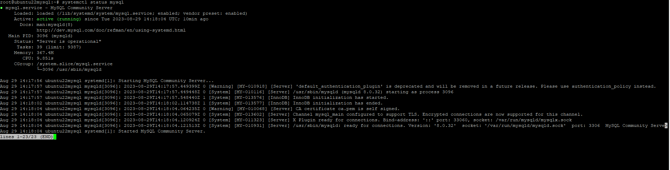

To start or stop the service:
`systemctl stop mysql`
`systemctl start mysql`
To access the mySQL console:
`mysql -u root`
#### Post-Installation / Users and Grants
Once the cluster is initialized, the basic users and grants must be created to be able to connect to MySQL.
A basic configuration is to allow access from any IP using the root user:
This configuration is accomplished by executing the following commands:
`mysql -u root -p`
`# MySQL solicita la password de root`
`CREATE USER 'root'@'%' IDENTIFIED BY '12345678';`
`GRANT ALL PRIVILEGES ON *.* TO 'root'@'%' WITH GRANT OPTION;`
`FLUSH PRIVILEGES;`
At this point, it is possible to connect from any SQL client.
There are two users that must be created so that the MySQL cluster can be monitored from Grafana.
`CREATE USER 'exporter'@'localhost' IDENTIFIED BY 'exporter' WITH MAX_USER_CONNECTIONS 3;`
`GRANT PROCESS, REPLICATION CLIENT, SELECT ON *.* TO 'exporter'@'localhost';`
`ALTER USER 'exporter'@'localhost' IDENTIFIED WITH mysql_native_password by 'exporter';`
` `
`CREATE USER 'grafana'@'%' IDENTIFIED BY 'grafana';`
`GRANT SELECT ON *.* TO 'grafana'@'%';`
`ALTER USER 'grafana'@'%' IDENTIFIED WITH 'caching_sha2_password';`
`ALTER USER 'grafana'@'%' IDENTIFIED BY 'grafana'; FLUSH PRIVILEGES;`
#### Configure OCC to use MySQL.
Once the MySQL master is installed, you must tell OCC what the IP of that server is.
To do this, the data associated with MySQL must be configured in the inconcert databag ( /etc/inconcert/chef/data\_bags/inconcert\_clusters/default.json ) databag:
```
"mysql": { "user" : "", "password" : "", "port" : "3306", "master_nodes" : [ { "ip" : "XXX.XXX.XXX.XXX" } ], "ndb_nodes" : [{ "ip" : "XXX.XXX.XXX.XXX" }] }
```
Running chef (Chef initial) with this setting will do the following:
- Connection to MySQL servers is enabled on server iptables.
- The cluster data is made available to the different OCC services that will use it (webdesigner, interactionrouter, etc.).
#### Procedure to reset the root user's password
In case you have problems with the root password, the following procedure allows you to reset it.
```
systemctl stop mysqlEn el archivo /etc/mysql/my.cnf, en la seccion [mysqld] agregar una linea que diga:skip-grant-tablessystemctl start mysqlmysql -u root mysqlUPDATE mysql.user SET authentication_string=null WHERE User='root';flush privileges;CREATE USER 'root'@'%' IDENTIFIED BY '12345678';GRANT ALL PRIVILEGES ON *.* TO 'root'@'%' WITH GRANT OPTION;FLUSH PRIVILEGES;Detener SQL y sacar la linea del archivo /etc/mysql/my.cnf
```
- [Troubleshooting](https://knowledge.platx.me/platx-knowledge/troubleshooting?hsLang=en)
- [Guides](https://knowledge.platx.me/platx-knowledge/guides?hsLang=en)
- [Technical Documentation](https://knowledge.platx.me/platx-knowledge/technical-documentation?hsLang=en)
- [Training](https://knowledge.platx.me/platx-knowledge/training?hsLang=en)
- [To do later](https://knowledge.platx.me/platx-knowledge/to-do-later?hsLang=en)
[](https://knowledge.platx.me/?hsLang=en)
[mailto:email@email.com](mailto:email@email.com)
Copyright © 2026,